Table of Contents
1. A calm beginning before the deep work starts
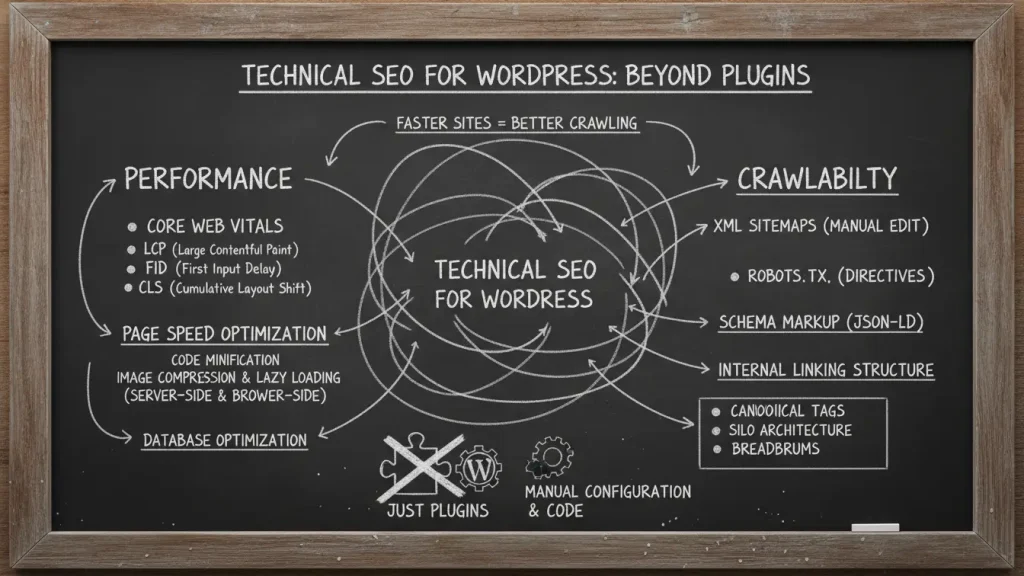
Decorating a small room teaches patience. You move one chair, step back, notice the light, and then adjust again. Building and maintaining a WordPress site often feels the same way. You work with limited space, limited time, and many moving parts. Still, when everything sits in the right place, the result feels calm and intentional. That is exactly how Technical SEO for WordPress works. It lives quietly in the background, supporting everything else. While plugins help, they do not do the whole job. When you understand what happens under the surface, your site feels lighter, easier to navigate, and more welcoming for both people and search engines.
2. WordPress technical SEO checklist 2026 that feels realistic
At first, technical SEO can feel heavy, much like unpacking boxes in a small apartment. However, when you break it down, each task has a purpose. A modern checklist starts with performance and speed, then moves through crawlability & indexing, and finally touches structure and trust. When you take time to speed up your WordPress site, you set a steady rhythm that supports everything else. Clean code, thoughtful themes, and simple layouts matter more than adding another tool. In other words, the checklist works best when you treat it as a design plan rather than a chore.
3. Performance and Speed start before any plugin
Performance & Speed do not begin inside a plugin screen. They begin on the server. Server-Side caching plays a quiet but powerful role here. When the server remembers pages instead of rebuilding them every time, your site feels calmer and faster. This approach helps Speed Up Your WordPress Site without touching the front end at all. At the same time, a reliable hosting environment supports consistent delivery, especially for visitors from the US, UK, Canada, and Australia. Think of it as choosing solid shelves before styling a room.
4. Image Optimization and Asset Optimization as visual balance
Images bring warmth and personality, yet they also carry weight. Image Optimization keeps that weight under control. When you resize images properly and compress them gently, pages load with less effort. Asset optimization works alongside this by reducing unused scripts and styles. Together, they help speed up your WordPress site while preserving visual comfort. Much like choosing linen curtains instead of heavy drapes, these small choices allow light to move freely through your pages.
5. CDN support and global comfort
A CDN quietly places copies of your content closer to your visitors. As a result, pages travel shorter distances and arrive faster. This matters greatly for international audiences. When someone in Australia visits a site hosted in North America, a CDN keeps the experience smooth. Used correctly, a CDN helps speed up your WordPress site without changing how it looks or feels. In essence, it works like local storage in every room, reducing unnecessary trips back and forth.
6. Crawlability and Indexing need clear paths
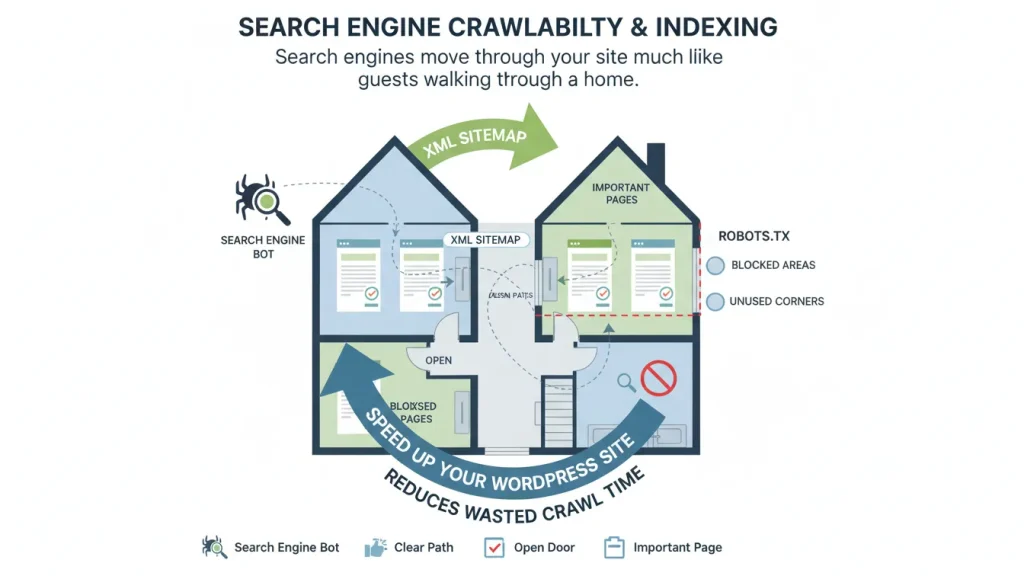
Search engines move through your site much like guests walking through a home. Crawlability & Indexing depend on clear paths and open doors. robots.txt tells crawlers where they can go, while XML Sitemaps guide them gently toward important pages. When these elements work together, they help speed up your WordPress site by reducing wasted crawl time. Search engines spend their energy on meaningful content instead of getting lost in unused corners.
7. URL Structure and Canonicalization keep things tidy
A clean URL Structure feels organized and calm. Short, descriptive URLs help users understand where they are. Canonicalization then steps in to avoid confusion when similar pages exist. Together, they support Speed up your WordPress site by keeping signals clear and focused. Much like labeling storage boxes, this clarity saves time later and prevents unnecessary repetition.
8. WordPress schema markup for SEO as subtle guidance
Structured Data (Schema) adds context without shouting. It quietly explains what your content means. Reviews, articles, and breadcrumbs all benefit from this extra layer. When used with care, schema helps speed up your WordPress site indirectly by improving how pages appear in search results. It does not overwhelm the layout. Instead, it acts like soft lighting that highlights the right details.
9. Site Architecture and Navigation that feels natural
Site architecture & navigation shape how visitors move. Internal Linking connects related ideas, while Breadcrumbs provide gentle orientation. When visitors feel comfortable, they stay longer and explore more. This behavior supports Speed Up Your WordPress Site by improving engagement signals. A well planned structure feels like an open plan room where movement flows naturally.
10. Security and Mobile trust matter more than ever

Security & Mobile considerations bring peace of mind. HTTPS protects data and builds trust. Mobile-First design ensures layouts adapt smoothly to smaller screens. When these elements align, they help speed up your WordPress site by reducing friction and errors. Visitors feel safe and comfortable, no matter the device they use.
11. Tools and Monitoring beyond plugins
Plugins like Yoast SEO or Rank Math SEO offer helpful guidance. An SEO plugin for WordPress free version can cover basics. Still, real insight comes from Tools & Monitoring. Google Search Console reveals crawl issues. Google Analytics shows how people behave. Site Audit Tools and PageSpeed Insights highlight areas for improvement. These tools help speed up your WordPress site through observation rather than guesswork. They act like mirrors, showing what truly needs attention.
12. A thoughtful wrap up for steady growth
Technical SEO does not demand perfection. It asks for care, patience, and attention to detail. When you treat your site like a thoughtfully designed space, every improvement feels intentional. By choosing smart hosting, clear structure, and gentle optimization, you create room for growth. Over time, these choices speed up your WordPress site in ways that feel natural and sustainable. Keep experimenting, keep refining, and let your site evolve with the same warmth and balance you bring to your favorite spaces.
FAQ
a. What is Technical SEO for WordPress?
Technical SEO for WordPress focuses on performance, crawlability, site structure, security, and indexing so search engines and users can access your content easily.
b. Can I speed up my WordPress site without plugins?
Yes. Server side caching, clean themes, optimized images, proper hosting, and CDN usage can speed up your WordPress site without relying heavily on plugins.
c. Why are XML sitemaps and robots.txt important?
They guide search engines to important pages and control crawling behavior, improving crawl efficiency and indexing accuracy.
d. Does site structure affect SEO performance?
Yes. Clear site architecture, internal linking, and breadcrumbs help users navigate and help search engines understand content relationships.
e. Which tools help monitor Technical SEO?
Google Search Console, Google Analytics, GTmetrix, PageSpeed Insights, and site audit tools help track performance and identify technical issues.